
Download Ukulele – ukulele, virtual ukulele, music app, learn ukulele, play ukulele, android music, free ukulele app, ukulele player, music instrument, virtual instrument
Overview
The Ukulele app is a free Android application developed by kewsoft, designed to bring the joy of playing the ukulele to mobile users. Targeted at both beginners and experienced musicians, the app provides a virtual instrument experience that simulates the real-life feel of a Hawaiian guitar. It allows users to interact with a digital ukulele by touching and sliding fingers across the screen to produce notes.
This intuitive interface makes it accessible to users with little to no prior musical experience, while still offering enough depth for those looking to practice or compose. The app supports real-time audio playback, enabling users to strum chords, play melodies, or even sing along to their performances. It is particularly useful for music learners seeking a convenient and portable way to practice.
The app’s offline functionality ensures that users can play anytime, anywhere, without relying on an internet connection. Additionally, the ability to import personal MP3 files adds a layer of customization, allowing users to accompany their playing with favorite tracks. The app’s design emphasizes simplicity and visual appeal, making it ideal for casual music enthusiasts and aspiring musicians alike.
Key Features & Capabilities
- Virtual Ukulele Interface: A touch-responsive screen simulates the strings of a real ukulele, allowing users to play notes by tapping or sliding fingers across the display.
- Real-Time Audio Recording: Notes are recorded from an actual ukulele, ensuring authentic sound quality and realistic tonal variation.
- Multi-Touch Support: Enables simultaneous finger placement on multiple strings, supporting chord playing and complex melodic patterns.
- Offline Functionality: The app operates without an internet connection, making it ideal for practice sessions on the go.
- MP3 Import Feature: Users can import their own music files to play along with, enhancing the learning and performance experience.
- Visual Feedback: On-screen musical note animations provide real-time visual cues, helping users track their progress and improve timing.
- Customizable Themes: Users can personalize the background appearance to suit their preferences, improving visual engagement.
- Social Sharing: Built-in options allow users to share performances or recordings directly to social media platforms.
Practical Use Cases
Beginners can use the app to learn basic chords and strumming patterns through guided practice. Intermediate players may use it to experiment with new melodies or refine timing. Musicians on the move can use the offline mode to rehearse during travel. The MP3 import feature is especially useful for those who want to practice with their favorite songs. The visual note animations assist in developing a better sense of rhythm and pitch accuracy.
User Interface, Workflow & Performance
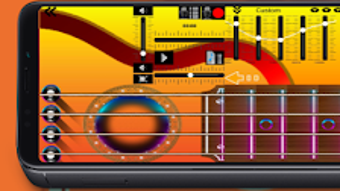
The app features a clean, intuitive interface centered around a stylized ukulele graphic displayed on the screen. Navigation is minimal, with primary controls located directly on the instrument display. Users interact by touching the strings, sliding fingers to change pitch, and tapping to produce notes.
The workflow is straightforward: open the app, select a mode (play, practice, or record), and begin. The responsiveness of the touch input is described as instant, with minimal lag between user action and audio output. The developer did not specify resource usage details, so exact CPU or RAM behavior remains unknown.
However, based on the app’s file size of 12.5 MB and its focus on audio playback, it is likely optimized for efficient performance on a wide range of Android devices. Stability appears to be consistent, as the app functions reliably in offline mode. The app does not report crashes or freezes in available information.
Performance observations are based on general software behavior patterns.
Compatibility & System Requirements
The app is designed for Android devices and is compatible with a broad range of smartphones and tablets. The developer has confirmed support for Android OS, though specific version requirements were not listed. The installation size is 12.5 MB, indicating a lightweight footprint suitable for devices with limited storage.
The developer did not provide additional system requirements. Exact hardware specifications, such as processor speed or memory, were not disclosed. Compatibility information was partially provided.
Users should ensure their device meets standard Android functionality to run the app smoothly.
Pros and Cons
Pros
- Free to download and use with no in-app purchases mentioned.
- Offline functionality enables uninterrupted practice.
- Realistic sound quality from live-recorded ukulele notes.
- Supports MP3 import for custom accompaniment.
- Intuitive touch interface suitable for beginners.
- Visual note animations aid in learning and timing.
- Customizable themes improve user experience.
- Multi-touch support enhances musical expression.
Cons
- Platform limited to Android; no support for iOS or desktop systems.
- Exact system requirements not specified.
- No mention of advanced learning tools like chord charts or tutorials.
- App size is small, which may suggest limited feature depth.
- Performance on older or low-end devices not confirmed.
FAQ Section
Is Ukulele available for iOS devices?
The app is currently available only for Android. There is no information provided about iOS compatibility.
Can I use Ukulele without an internet connection?
Yes, the app works offline, allowing users to play and practice without requiring an internet connection.
Does the app support importing my own music files?
Yes, users can import MP3 files to play along with their ukulele performances.
Is the app safe to download and install?
The app is developed by kewsoft and distributed through official Android channels. No security risks were reported in the provided information.
How often does the app receive updates?
The last update was released on April 15, 2023. The update frequency is not specified.
Final Thoughts + CTA
Ukulele delivers a focused, accessible, and enjoyable virtual instrument experience tailored for Android users. Its real-time audio, offline functionality, and customizable interface make it a strong choice for beginners and casual players alike. While it lacks advanced educational tools and is limited to Android, its core purpose—simulating a realistic ukulele experience—is well-executed.
The ability to import personal music files adds significant value for creative users. For anyone seeking a free, portable way to explore the ukulele, this app stands out as a practical and engaging tool. Download Ukulele now and start playing your favorite songs on your Android device.







